
Introduction: One Link, Unlimited Potential
Your link in bio might seem small, but what you maybe don't realise - is that it's a digital powerhouse. Whether you’re a business owner, content creator, or marketer, your bio link is one of the most valuable tools for boosting website traffic, generating leads, and converting Instagram followers into loyal customers.
But here's the thing—most people settle for just one link and hope for the best. But, with a smart social media management, bio strategy and the right bio tools, you can turn that single link into a conversion machine, reaching far more people.
Whether you’re a business owner, content creator, or marketer, your bio link is one of the most valuable tools for boosting website traffic, generating leads, and converting Instagram followers into loyal customers — especially when combined with expert guidance from a marketing consultancy .
Ready to drive more clicks? These seven expert tips will show you exactly how to do it—using everything from a branded bio page to Google Analytics.
1. Create a Custom Bio Landing Page That Converts
Let’s start with the foundation—your bio landing page.
Instead of linking to a random homepage, create a custom landing page that brings all your important links together. Think of it as a mini website. You can highlight your latest blog post, feature a product from your online store, and link to other social media accounts—all in one place.
Use tools like Linktree, Unbounce, or Carrd to create a customisable link experience with strong branding and smooth navigation.
Why it works: Users engage more with a visually branded landing page that offers relevant links they can explore (Search Engine Journal, 2024). Not convinced? Some of these apps will show you click analytics - so you can see the results for yourself.
2. Add Multiple Links Using a Single Dashboard
Gone are the days of choosing just one link. Tools like Beacons, Campsite, and Replug let you add multiple links through a single dashboard, making it easier to manage your entire bio section.
Whether you want to:
- Promote Instagram posts
- Link to a TikTok bio
- Highlight social media channels
- Or drive traffic to an online store
These tools allow you to create a clickable link experience that’s functional and user-friendly. Using these tools also supports TikTok marketing & management, making it easier to consolidate content and drive engagement across all platforms
Pro tip: Keep your top call-to-action at the top—it’s the first thing users will click.
3. Use Instagram’s Native ‘Up to Five Links’ Feature
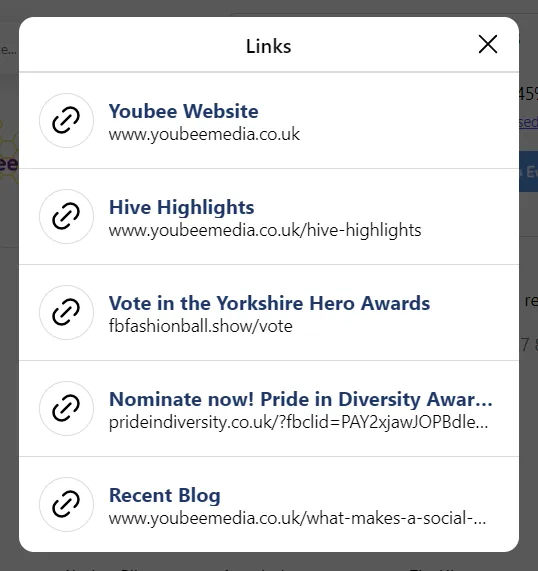
Instagram now lets you add up to five links directly to your Instagram bio—a major upgrade for anyone juggling multiple URLs.
To set it up:
- Go to your Instagram profile
- Tap Edit Profile
- Navigate to the Links section
- Add external links one at a time
You can now direct followers to your website, newsletter, shop, podcast, or any page that supports your goals—all without needing extra tools.
SEO bonus: These links contribute to your profile’s relevance in search engines, especially when paired with the right bio features and keyword-optimised descriptions.
4. Optimise Link Text with Keywords That Drive Clicks
Link text is everything. A plain “Click Here” won’t cut it in 2025.
Instead, craft bio tips that speak directly to your audience. Use descriptive, benefit-driven language like:
- “Download Our Free Social Media Strategy Guide”
- “Explore the New Spring Collection”
- “Watch Our Latest Digital Marketing Tips”
Incorporate keywords naturally to support your SEO and help search engines better index your bio page.
5. Add Visuals That Draw Attention
Want to increase engagement? Use visuals to make your bio landing more appealing. Many bio tools let you add images, logos, or icons next to your links.
This doesn’t just make your profile page look more professional—it also helps draw attention to your most important links.
What to include:
| Visual Element | Why It Works |
|---|---|
| Branded icons | Build brand recognition |
| Thumbnails | Add context to content |
| CTA graphics | Highlight offers or events |
Remember, your bio section should reflect your overall visual identity—especially if you’re managing multiple social platforms.
6. Use Data to Refine Your Bio Strategy
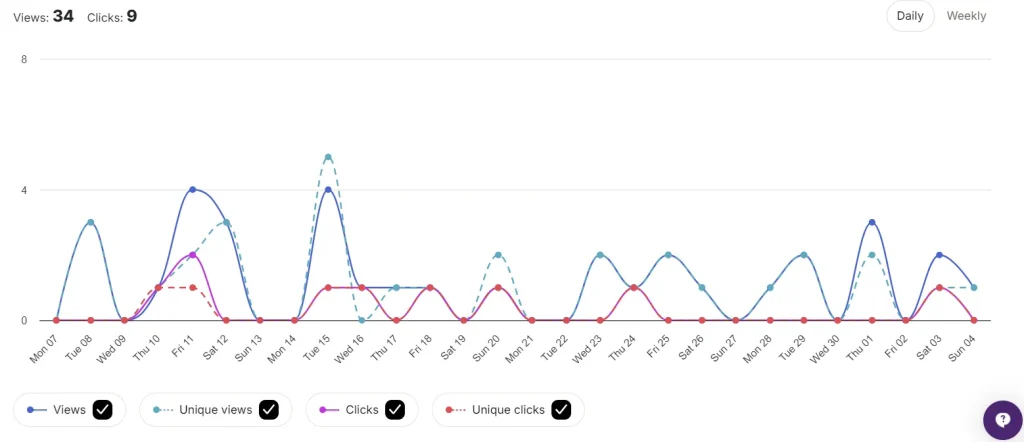
Don’t guess what’s working—measure performance using Google Analytics or native analytics from your bio tools.
Track:
- Which links get the most clicks
- What time your audience is most active
- Where your website traffic is coming from
This data helps you optimise your bio landing page regularly and make informed decisions about which content to prioritise.
Smart move: Add UTM parameters to each url for precise tracking across social media marketing campaigns.
7. Keep It Fresh with Seasonal Content and Timely CTAs
Nothing kills clicks like a stale Instagram bio link. Regularly update your link in bio to reflect what’s happening now—sales, launches, live events, or trending content.
Examples:
- “Book a 1:1 Strategy Call This Week”
- “New YouTube Video Just Dropped”
- “Join Our Free Workshop—Limited Spots!”
Rotating your relevant content shows followers you’re active, up-to-date, and focused on providing value. That’s what keeps people clicking.
Conclusion: Turn Your Bio into a Conversion Hub
Your bio isn’t a static detail—it’s a dynamic tool to attract and convert your audience. With the right layout, visuals, and bio tools, you can drive engagement, increase social media followers, and bring in more traffic from every click.
Here’s your checklist for better bio results:
- Build a branded bio landing page
- Add multiple links with analytics tracking
- Use Instagram’s up to five links feature
- Write keyword-rich, clickable CTAs
- Keep your visuals and content fresh
- Use data to refine your bio strategy
- Align everything with your digital marketing goals
When done right, your link in bio becomes more than a URL—it becomes a smart, strategic funnel that turns casual scrollers into potential customers.
Frequently Asked Questions About Your Link in Bio
1. What is a bio link and why is it so important?
A bio link is the clickable URL you add to your Instagram bio, TikTok bio, or other social profiles. Since platforms like Instagram only allow one link in your profile page, this space becomes crucial for driving users to your website, blog post, landing page, or other key content.
To get the most out of it, build a bio landing using bio tools like Linktree or Replug. These tools help you create a central hub of social links, giving your audience access to all your most important links from a single dashboard.
2. How do I create a high-converting landing page for my Instagram bio?
Start by using a customisable link or custom link builder like Beacons, Carrd, or Unbounce. These platforms let you design a landing page (also called a bio page) that aligns with your brand and helps you drive traffic to the right places.
Include links to:
- Your latest blog post
- A featured product or offer
- Your other social media profiles
- A sign-up form or free resource
By optimising your Instagram bio link, you improve the chances that Instagram followers click through to your website—which is exactly what good digital marketing is all about.
3. Can I add multiple links to my Instagram bio?
Yes! Instagram now lets you add up to five links natively in your Instagram profile. To access this:
- Go to your Instagram account
- Tap Edit Profile
- Scroll to Links and tap Add external link
You can also use external bio tools to add multiple links and track performance through analytics. This approach is ideal for anyone managing both Instagram and TikTok bio links, or trying to consolidate their online presence.
4. What's the best way to optimise my bio link for SEO and engagement?
To maximise both clicks and visibility in search engines, follow these few tips:
- Use keyword-rich link titles (e.g., “Download My Free Content Calendar” instead of “Click Here”)
- Keep your bio landing fresh by updating it with new content or CTAs regularly
- Link to relevant pages like your website, blog post, or online store
- Choose a unique link (e.g., yourname.bio) for consistent branding
A strong bio strategy is key to growing your personal account or brand through smarter social media marketing.
5. Are there free plans or low-cost tools to help me manage my bio page?
Absolutely. Many bio tools offer free plans with solid features. For example, Linktree, Tap.bio, and Milkshake all let you create a bio landing page with multiple links, even on a budget.
As your needs grow, upgrading to a paid tier unlocks more customisation, analytics, and integrations with social media profiles, email lists, and CRMs.
Even with the basics, you can highlight your most important links, boost more engagement, and keep your audience connected across platforms using just one link.