
If you have ever opened TikTok analytics and thought “what on earth am I looking at”, don't worry - you're not on your own. TikTok users are spoiled for choice with graphs, charts and numbers, but not all TikTok metrics are created equal when it comes to actual revenue.
This guide focuses on TikTok analytics for sales. That means the key TikTok metrics that help you find potential customers, drive sign ups, and see measurable results from the time you spend creating content. No fluff, no drama, just the numbers that matter and what to do with them.
Once you understand the most important TikTok metrics and how they link to your content strategy, ad spend and offers, your TikTok presence stops feeling like guesswork. You get a deeper understanding of what works, what needs to change and where your next bit of graft should go.
Stick the kettle on, open up your TikTok account and let’s get into it.
Setting Up TikTok Analytics So You Can Actually Track Sales
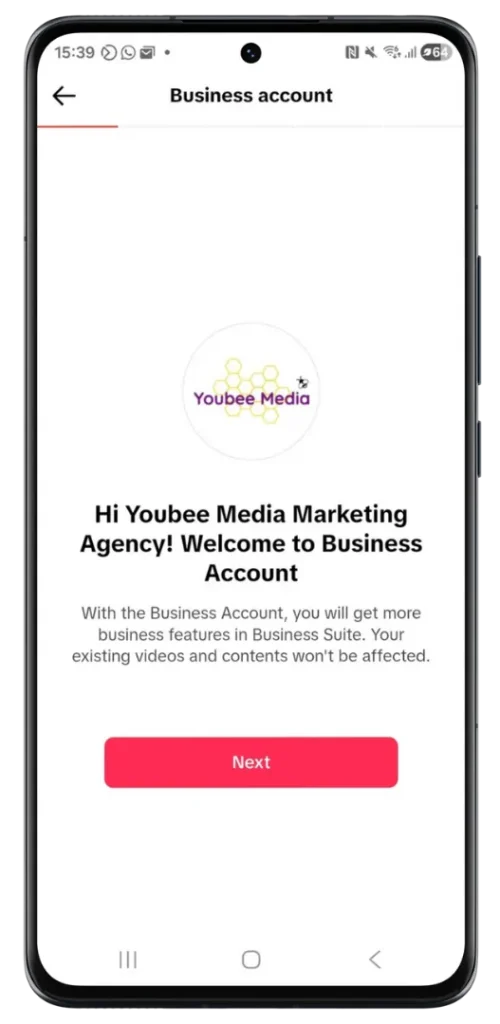
Before you worry about which key metrics to track, you need to make sure your account is set up properly.
1. Switch To A Business Account
A TikTok business account unlocks:
- Full TikTok analytics inside the app
- Access to Creator Tools and the Business Suite
- Extra profile fields so you can add links to landing pages and other platforms
- More advertising options, including in feed ads and spark ads
If you're serious about driving conversions, lead generation and s
2. Connect TikTok Ads Manager And TikTok Pixel
If you run TikTok ads, you will spend a lot of time in TikTok Ads Manager. This is where you:
- Set up each ad group
- Choose your target audience and selected date range
- Track conversions and cost per results from different campaigns
- Compare in feed ads and spark ads against your organic content
To properly track conversions on your website you will probably also need TikTok Pixel or the Events API installed on your landing pages and key form submissions. These tools send events back to your TikTok account so you can:
- See which ads and organic content are driving conversions
- Attribute leads and sales correctly
- Build new audiences based on people who already engaged with you
Think of TikTok Pixel and the Events API as the bridge between your videos and your bank balance.
3. Connect Multiple Platforms For A Full Picture
Most brands show up on multiple platforms, not just TikTok. You might also be active on Instagram, YouTube and other social media channels. Connecting your TikTok analytics to third party tools gives you a more complete view of:
- How people move between platforms
- Which traffic sources bring the best potential customers
- How TikTok compares against other platforms on sign ups and sales
You don't need every tool under the sun, but it's more about having a small way to test and measure your results. Start simple, check you can log in easily and make sure your tracking metrics match across systems.
Audience Metrics: Who Is Actually Watching
Audience metrics give you a deeper understanding of the people behind your video views. This is where you move from “we got loads of likes” to “we know exactly who we are talking to and why they tune in”.
The important TikTok metrics here are your follower metrics and audience demographics.
Follower Demographics And Audience Insights
Inside TikTok analytics you will find:
- Follower demographics such as age range, gender and location
- Audience demographics including language and interests
- Audience insights about when your followers are most active times
- Traffic sources showing how people discovered you in the first place
Use these metrics to answer simple questions:
- Are we attracting the target audience we actually want
- Are our new followers in the right locations
- Does our age range match the people who usually buy from us
- How can we pivot our messaging to reach more target customers
When you match your data against industry benchmarks, you start to see where you are ahead of the game and where things are looking a bit daft.
Follower Growth And Profile Behaviour
Follower growth is not just for the ego. It is one of the key TikTok metrics that shows whether your TikTok strategy is moving in the right direction.
Look at:
- New followers across a selected date range
- Overall audience growth over months, not just days
- Profile visits, particularly after a strong piece of content
- Follower metrics such as when people follow, unfollow and return
Use different date range views, such as last 7 days, last 28 days and custom periods, to spot patterns. If follower growth, profile visits and audience growth all climb after a particular style of video, that's a clear signal to create content in that direction.
If they dip, it might be time for new ideas, different formats or a tweak in tone.

Engagement Metrics: Are People Bothered Or Just Scrolling
Next up are engagement metrics. These show whether people are interested enough to stop, watch and interact, rather than just scrolling past your entire video in the following feed.
The most important engagement metrics include:
- Video views and unique viewers
- Likes, comments and shares
- Engagement rate across individual videos and your account overall
- Click through rate on links inside your profile and ads
Watch Time, Completion Rate And Where Viewers Drop Off
Watch time is one of the most important TikTok metrics, because it tells you how long people stick around. Look at:
- Average watch time for individual videos
- Time viewers spent watching compared with the length of the entire video
- Completion rate, the percentage of people who watched right to the end
- Points where viewers drop off and disappear
If average watch time and completion rate are low, it is a sign your hook is weak or your content is wandering off. If they are high, well done, keep going.
Live analytics and live metrics also matter if you use LIVE as part of your engagement strategy. Check:
- How many unique viewers drop in
- How long they stay
- Which topics keep them chatting and which ones make them leave
It is a bit like a dj reading the room at a party. The data tells you when people are leaning in and when you've lost them.
Video Performance: Turning Data Into Better Content
Rather than judging video performance by feeling, use TikTok analytics to compare individual videos side by side.
Key metrics to track here include, and you will usually look across multiple metrics rather than obsessing over one number:
- Video views and profile visits generated
- Engagement rate on individual videos
- Average watch time and completion rate for different formats
- Traffic sources that send people to each clip
Look for top performing videos across a selected date range. Ask:
- What topic were we covering
- What hook did we use at the start
- How long was the video
- What was on screen when engagement spiked
Use that deeper understanding to create content that leans into what works. You can test different formats, for example:
- Short, punchy tips
- Slightly longer storytelling clips
- Organic content versus in feed ads and spark ads
Do not forget to check live metrics and live analytics if you run live sessions. These can generate new followers, profile visits and plenty of new ideas for your next batch of content.
Conversion Metrics: From Views To Revenue
Views and likes are nice, but sadly, they don't pay the bills. To boost conversions and revenue you need to focus on conversion metrics and cost per outcomes.
Key Conversion Metrics To Watch
Inside TikTok Ads Manager and, in some cases, the regular TikTok analytics, look at:
- Conversion rate from video views to clicks and from clicks to actions
- Click through rate on ads, links and call to action buttons
- Form submissions and sign ups on your landing pages
- Direct sales or lead generation events from your TikTok ads
You will often track conversions using TikTok Pixel, the Events API or a similar tool. These help you see exactly which ad group, in feed ads or spark ads are driving conversions so you are not guessing.
Cost Per And Ad Spend
To make smart decisions about ad spend, keep an eye on cost per metrics, for example:
- Cost per click (CPC)
- Cost per conversion
- Cost per thousand impressions
Compare cost per figures across:
- Different ad group structures
- Different audiences and age range targeting
- Different placements and formats
Your goal is steady growth with sensible costs, not chasing maximum reach at any price.
This is where the Business Suite view, combined with TikTok Ads Manager, really helps you get measurable results and make calm, data based decisions.
Attribution Windows And Sales Cycles
Attribution windows describe how long TikTok will keep crediting conversions back to a certain ad or piece of content. They are a vital part of TikTok analytics for sales because they influence how you read the numbers.
Shorter attribution windows show quick wins, longer windows show how TikTok supports a full customer journey over time.
Align your attribution windows with:
- Your usual sales cycle
- How long potential customers take to decide
- The kind of offers you are running
If you sell low cost products, a shorter window might be fine. For higher value services, people often need more time, more content and more touchpoints across multiple platforms before they act.
Content Strategy: Using Analytics To Decide What To Make Next
TikTok metrics only matter if they influence what you do next. This is where content strategy and engagement strategy come together.
Use your tracking metrics to answer:
- What topics pull in the right target audience
- Which hooks and openings keep watch time high
- Which formats lead to profile visits, new followers and sign ups
- Which videos quietly drive the most form submissions and landing page conversions
From there you can build a TikTok strategy that includes:
- A mix of organic content and TikTok ads
- Content created for different stages of the funnel, from awareness to decision
- Posts designed to spark comments and messages as part of your engagement strategy
- Regular testing against industry benchmarks and your own past performance
Remember, the TikTok algorithm rewards content that keeps TikTok users engaged. If your data shows that certain topics, formats or active times give you better engagement rate and watch time, take the hint.
You do not have to reinvent yourself every week. You simply have to learn, refine and keep showing up.
Simple Weekly Workflow For Tracking TikTok Analytics For Sales
To keep this useful in real life, here is a simple weekly routine you can follow. No need to live in your analytics tab.
- Pick your selected date range
Usually last 7 days or last 14 days is enough to spot trends without getting lost. - Check audience and follower metrics
Look at follower growth, new followers, follower demographics and audience insights. Are you reaching the right target audience or drifting off. - Review engagement metrics
Check engagement rate, video views, unique viewers, average watch time and where viewers drop. Make a note of any individual videos that did particularly well or badly. - Identify top performing videos
For each top clip, check topic, length, format and hook. Use this to generate new ideas and refine your content strategy. - Review conversion metrics
In TikTok Ads Manager or your business suite, review conversion rate, click through rate, cost per and key conversion metrics such as form submissions and sign ups. Check which traffic sources and ad groups are driving conversions. - Decide one or two actions
Maybe you test different formats next week, shift some ad spend to a stronger audience, or create content for a new audiences segment that keeps popping up in your analytics.
That is it. Bite sized, repeatable and realistic, even on a busy week.
Bringing It All Together

TikTok analytics can look intimidating at first glance, but once you know which key metrics matter for sales, they become one of the most useful tools in your marketing kit.
Focus on your audience metrics for a deeper understanding of who you reach, engagement metrics to see who is actually paying attention, video performance metrics to find your top performing videos and conversion metrics, cost per and attribution windows to track real revenue
Used well, TikTok analytics for sales help you create content that feels natural, speak to the right people at the right time, and drive steady growth instead of guessing.
You don't need to sit with spreadsheets all day. You do need to check your numbers regularly, trust what they are telling you and keep adjusting your TikTok strategy so every entire video, every ad group and every campaign pulls its weight.
That is how you turn a busy TikTok presence into something that reliably boosts conversions, fills your pipeline with potential customers and keeps sales coming in long after the latest trend has moved on.
If you want experienced eyes on your numbers and a calm plan for what to do with them, you can always bring in support rather than trying to juggle everything alone. You might:
- Shape your wider TikTok strategy and sales funnel with our marketing consultancy
- Build confidence reading TikTok analytics in our practical marketing workshops
- Hand over the day to day content and optimisation with our social media management
However you do it, the goal is the same. Less guessing, more clarity, and a TikTok presence that genuinely supports your revenue goals.