
Let’s talk about TikTok Coins, the glittery in-app currency you can’t physically hold but will happily empty your bank account for.
To purchase TikTok Coins safely and affordably, use the TikTok app’s coin purchase section, select a package, and pay through trusted methods like PayPal, Google Play, or the Apple App Store.
You can also leverage in-app promotions or regional pricing for discounts.
Whether you’re here to figure out how to buy TikTok Coins, save money, or understand why they’re suddenly disappearing faster than your paycheck, this guide has you covered.
What Are TikTok Coins?
Virtual Currency Explained
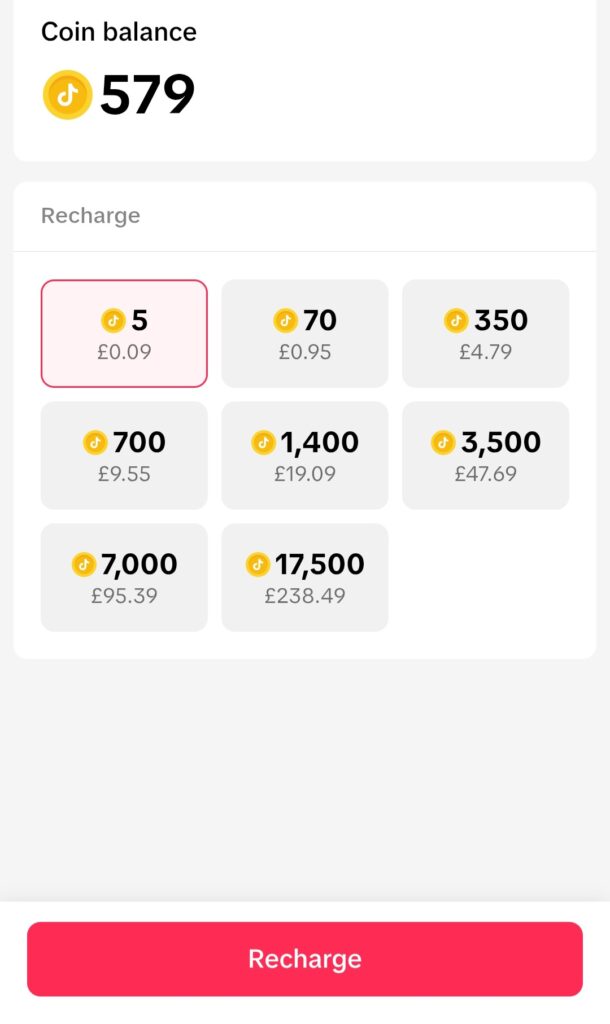
TikTok Coins are the platform’s official in-app currency, and while they don’t exactly scream “investment,” they’re perfect for making your presence felt on TikTok live streams. Here’s the breakdown:
- Send Virtual Gifts: Because nothing says "I love your content" like a shiny icon you paid real money for (TikTok Support, 2024).
- Boost Content Visibility: Spend coins to get your TikTok videos in front of more eyeballs (because your friends aren’t always enough).
- Support Creators: Gifting the creators' coins helps them earn diamonds, which can be converted to actual money (TikTok Creator Policy, 2024).
And just to be clear: TikTok Coins are not cryptocurrency. You can’t mine them, trade them, or use them outside the TikTok app. They’re exclusively part of the TikTok ecosystem (TikTok Coin Policy, 2024).
How to Buy TikTok Coins
The Official TikTok Coin Purchase Section
Buying TikTok Coins is pretty straightforward. Here’s how:
- Open TikTok: You can’t buy coins without logging in. Revolutionary, right?
- Access Settings: Tap your profile, head to your wallet, and prepare for financial introspection.
- Tap Recharge: Choose a coin package—the bigger, the better (for TikTok’s wallet, at least).
- Pick a Payment Method: TikTok offers:
- Credit/Debit Cards
- PayPal for cautious spenders (PayPal Security).
- Google Pay or Apple Pay (Google Pay Help, Apple Support).
- Regional options like AliPay and WeChat Pay for non-U.S. users (AliPay International, WeChat Pay).
Payment Methods and Risks
Each payment method has its quirks, so here’s what you should know:
- Credit/Debit Cards: Quick and convenient—until someone hacks your account.
- PayPal: Adds an extra layer of security, great for when TikTok “accidentally” auto-recharges your coins (PayPal Security).
- Google Pay and Apple Pay: Ideal for digital natives who’d rather tap than type.
How Much Do TikTok Coins Cost?
TikTok Coins Cost Breakdown
The cost of TikTok Coins depends on your location and device. For example:
- Brazil: 70 Coins cost approximately $0.72 (CyberNews, 2024).
- Mexico and the Philippines: Also budget-friendly options.
- United States: Pricier, but you get the satisfaction of “supporting creators” at first-world prices.
On iOS devices, expect to pay more because Apple takes a cut. Android or web purchases are typically cheaper (TikTok Coin Policy, 2024).
How to Buy Cheap TikTok Coins
Tips to Save Money
TikTok Coins can feel overpriced, but savvy users can save money:
- Look for In-App Promotions: TikTok often runs discounts for new users or during special events (TikTok Offers).
- Use a VPN: Change your location to a country with lower coin prices, such as Brazil (CyberNews, 2024).
- Avoid iOS: Buy coins via Android or TikTok’s website to dodge Apple’s premium surcharge.
Using a VPN to Access Cheaper Coin Packages
Want to buy TikTok Coins cheaper? Using a VPN is a common strategy for savvy users. Here’s how:
- Choose a Trusted VPN: Providers like ExpressVPN or NordVPN are good bets (VPN Security Guide).
- Set Your Location: Change your location to a country like Brazil, where coins are cheaper.
- Log in to TikTok: Open the app and navigate to the coin purchase section.
- Buy Coins: Select a coin package and enjoy the savings.
What Can TikTok Coins Do?
The Fun Stuff
- Send Virtual Gifts: Join live streams, pick your favorite shiny icon, and bask in the glow of fleeting on-screen fame.
- Boost Content Visibility: Coins can make you “TikTok famous,” or at least give you a fighting chance.
- Unlock Exclusive Features: Some features or perks are only accessible if you’ve got coins to burn (TikTok Creator Policy, 2024).
How to Avoid TikTok Coin Scams
Don’t Be That Person
TikTok scammers prey on users who think “free TikTok Coins” are real. They’re not.
Red Flags to Watch For
- Websites offering free Coins in exchange for your login credentials.
- Suspiciously cheap deals on third-party platforms.
- “Hacks” or apps claiming to unlock free Coins. Spoiler: They unlock nothing but disappointment.
How to Stay Safe
- Buy Coins only through the official TikTok app (TikTok Support, 2024).
- Avoid public Wi-Fi when making payments (FTC, 2024).
Recharge TikTok Coins
If you’ve used up your Coins on virtual gifts, it’s time to recharge. Simply:
- Go to the coin purchase section in TikTok.
- Pick a coin package.
- Pay up and enjoy another round of spending.
Pro Tip: Larger packages often come with discounts—TikTok’s way of convincing you to spend more.
Can You Get Free TikTok Coins?
The short answer: No, unless TikTok is feeling extra generous. However, keep an eye out for:
- TikTok Events and Promotions: These sometimes offer discounted Coins or rewards (TikTok Offers, 2024).
- Live Stream Gifts: Creators can convert received gifts into diamonds, adding a small cash incentive.
Refund Policies for TikTok Coins
TikTok’s refund policy is strict: Coins are non-refundable unless there’s an error in the transaction (TikTok Coin Policy, 2024). For issues:
- Contact TikTok Support through the app.
- Provide your transaction details.
- Hope for the best.
Master TikTok with Youbee Media Workshops
Feeling lost in the whirlwind of TikTok trends, algorithms, and Coin economics? Our Youbee Media Workshop is here to help you cut through the noise and unlock the true potential of TikTok for your business or personal brand. This is a great way to get started and understand the basics. But sometimes, people want a little bit of 1:1 support to make sure they're on the right track. Booking a training session is easy, and you can start with a consultation through Calendly.
Whether you’re new to the platform or ready to level up your content game, our small workshops are packed with tools, tips, and practical tricks to help you grow your audience and get the most out of TikTok’s powerful ecosystem.
What You’ll Learn
- Short-Form Video Essentials: Discover how to create scroll-stopping content that captures attention and keeps viewers coming back for more.
- Content Planning: Learn how to build a strategy that works, from finding trending filters to mastering TikTok’s editing tools.
- Audience Engagement: Turn viewers into loyal followers with smart, actionable tips to scale your presence on TikTok.
Why Choose a Youbee Media Workshop?
- Led by Experts: Our sessions are hosted by Rebecca Hopwood, an experienced marketeer who knows TikTok inside out.
- Bite-Sized and Actionable: Workshops last just 45–90 minutes, making it easy to fit learning into your busy schedule.
- Tailored to Your Goals: Whether you’re promoting a brand, building a personal following, or figuring out TikTok for the first time, we’ve got a session that fits.
Ready to Get Started?
👉 Explore Our TikTok Workshops to find the right session for you and start building your confidence, creativity, and results on TikTok.
From virtual workshops to in-person coaching, we’ll guide you through everything you need to know about TikTok—without the fluff. Don’t just keep up with the trends—set them.
Frequently Asked Questions About TikTok Coins
1. How Do I Purchase TikTok Coins?
To purchase TikTok Coins, follow this step-by-step guide:
- Open the TikTok app on your device.
- Access your TikTok account and navigate to the coin purchase section under the wallet in settings.
- Select a coin package—TikTok often offers coins in different bundles to suit your budget.
- Use a trusted payment method like your Google Play Store or Apple App Store account, PayPal, or a linked card.
- Confirm the transaction and start enjoying your new Coins for virtual items like gifts or content boosts.
Note: Prices can vary depending on your region, device, or in-app discounts.
2. How Many TikTok Coins Do I Need to Send Gifts?
The number of Coins you’ll need to send gifts depends on the virtual item’s value:
- Small gifts may cost as few as 5 Coins.
- Larger, flashier gifts can cost thousands of Coins, perfect for grabbing attention during live streams.
Check TikTok’s gift catalogue in the app for the number of coins required for each item. Sending gifts is a direct way to interact with creators and even earn shout-outs during streams.
3. How Do I Recharge Coins?
If you’ve run out of Coins, recharging coins is simple:
- Go to the coin purchase section in the TikTok app.
- Tap the Recharge Coins button and select a coin package.
- Use your saved payment details from Google Play or Apple App Store, or enter new ones.
- Confirm the purchase and enjoy your refreshed balance.
Recharging Coins lets you send more gifts, unlock exclusive content, and support your favorite creators in real time.
4. How Many TikTok Coins Equal One Diamond?
When creators receive gifts during live streams, they’re converted into diamonds—TikTok’s system for allowing users to earn money. While the exact exchange rate between Coins and diamonds isn’t public, many TikTok users note that diamonds typically hold a lower value than the Coins you send. TikTok also takes a percentage as a platform fee, so creators earn less than the Coin’s original cost.
5. What’s the Best Way to Buy Coins for More Followers?
If you’re buying coins to promote your content or attract more followers, consider these tips:
- Look for TikTok’s in-app purchases or promotions offering discounted coins.
- Use a VPN to buy Coins from regions where they’re cheaper.
- Invest in larger packages to get more Coins per dollar spent.
Using Coins to boost your content or interact with creators can help grow your audience and make your profile stand out.
6. Do TikTok Coin Prices Vary Depending on the Platform?
Yes, TikTok Coin prices vary depending on several factors, including your location, device, and payment method. For example:
- Purchases made on the Google Play Store or TikTok’s website are often cheaper than on the Apple App Store because Apple charges higher fees.
- Regional pricing differences mean Coins may cost less in countries like Brazil.
- TikTok often offers coins at a discount during holidays or special promotions, as mentioned earlier.
Be strategic about when and where you buy your Coins to save money while enjoying the platform’s full experience.
Conclusion
Buying TikTok Coins can enhance your TikTok experience, whether you’re sending gifts, boosting content, or supporting your favourite creators. To make the most of your Coins:
- Stick to official TikTok channels for purchases.
- Use discounts, promotions, and VPNs to save money.
- Avoid scams and third-party platforms.
At the end of the day, TikTok Coins are a fun way to engage with the platform—but only if you’re smart about how you buy and use them. Don’t let the glitter blind you to your budget!
Need support with TikTok marketing and management ? Youbee Media can help, and Becky’s marketing workshops offer hands-on consultancy advice to go further with your social media management skills.