If you want to understand how to drive traffic to your website from social media, getting more reach is only part of the answer. The topic of the post, the reason someone clicks and the page they reach afterwards all need to make sense together.
This guest article for Youbee Media by Vamos Web Design in Bristol looks at what happens after someone discovers a business through social media, and how the website can continue that journey rather than leaving visitors to find their own way.
Once someone leaves the social platform, the website takes over. The destination page needs to continue the same topic, answer the visitor’s immediate question and make the next step easy to understand.
Social media can introduce someone to your business, answer an initial question or create interest in a service. The website then has to build on that interest. When the two are disconnected, even strong social engagement can result in visitors arriving on the wrong page, struggling to find what they expected or leaving without taking another action.
Key Takeaways
- Social reach is more valuable when every important topic has a relevant website destination.
- Avoid sending every social visitor to the homepage when a more specific page is available.
- The message on the landing page should continue naturally from the post that generated the click.
- Social media calls to action should explain what someone can expect after following the link.
- Track social visits so you can see which content is attracting people who continue to engage with the website.
Why Social Reach Does Not Automatically Create Website Traffic
Reach, impressions, and engagement tell you that people are seeing or interacting with your content. They do not necessarily tell you whether those people are moving on to your website.
A post can receive plenty of likes because it is useful, entertaining or timely without giving the reader any reason to leave the platform. That is not automatically a problem. Some social content exists to build recognition or trust rather than generate immediate clicks.
The problem appears when the goal is website traffic, but there is no clear route towards the website.
Youbee Media makes a similar distinction in its article about organic and paid social media. Before increasing reach through paid activity, it recommends looking at factors such as the messaging, call to action, landing page and customer journey when existing engagement is not producing the desired next step.
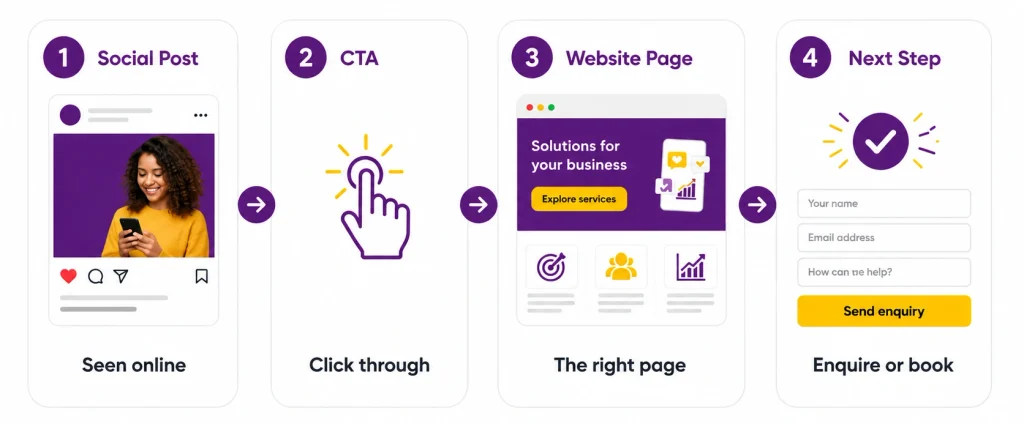
This is a useful way to think about how to drive traffic to your website. Instead of treating the social post and website as separate marketing activities, treat them as two stages of the same journey.
The social post creates the reason to care. The link provides the route forward. The website needs to deliver what the visitor expected to find.
Keep Your Social Topics Connected to Your Website
Consistent social content becomes easier to turn into website visits when the topics you regularly discuss are also reflected on the site.
Imagine a small accountancy firm that repeatedly posts about bookkeeping mistakes, payroll deadlines and tax planning. If its website contains clear pages and helpful resources around those same subjects, each post has somewhere relevant to lead.
If the website only contains a homepage and a general services page, the connection is weaker. A visitor interested in one specific payroll question may arrive on a page that asks them to search through several unrelated services before finding anything useful.
That extra work matters.
The aim is not to create a new landing page for every social post. Instead, identify the subjects you regularly discuss and make sure the website has useful destinations that develop those topics further.
Build Around Topics Your Audience Already Cares About
Start with recurring subjects rather than individual posts.
A removals company might regularly talk about preparing for moving day, packing fragile items, office relocations and storage. A therapist may discuss anxiety, OCD, trauma and what happens during a first appointment.
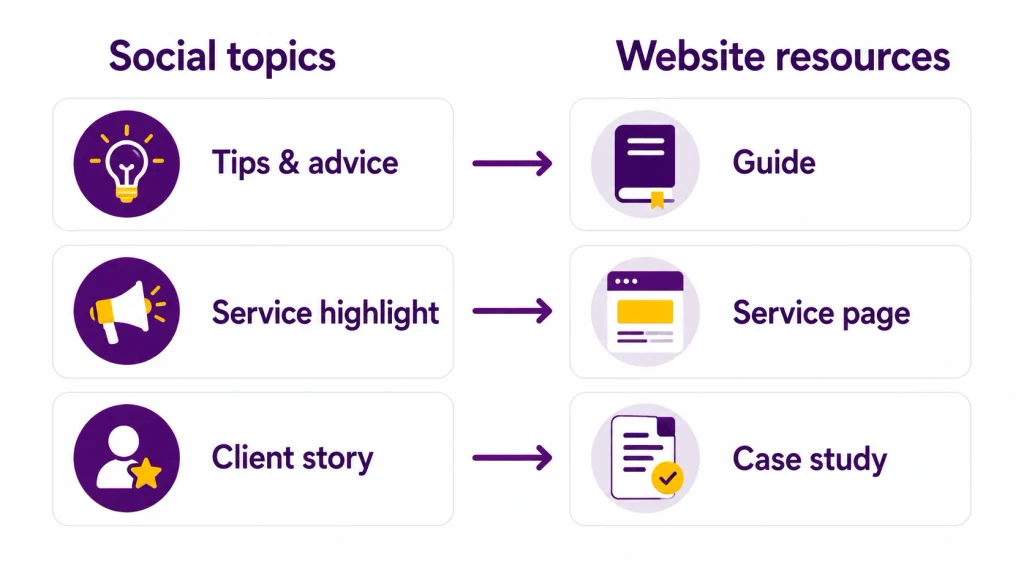
These subjects can become content themes across social media while linking naturally to service pages, guides, FAQs or case studies on the website.
Youbee Media describes this type of structured planning through content pillars within its social media strategy service. The benefit is that individual posts become part of a wider direction rather than isolated updates.
For businesses working out how to drive traffic to your website, those content themes provide a practical bridge between social discovery and deeper website information.
Give Useful Topics Somewhere to Lead
Before publishing a social post that you want people to click through from, ask what they should find after the click.
If the post gives three quick tips about choosing an accountant, a longer guide may be the natural destination. If it discusses a problem solved by one of your services, the relevant service page may make more sense.
Sometimes there is no appropriate page yet. That can reveal a website content gap.
It does not mean every social idea needs its own URL. It means important subjects should have a logical home somewhere on the website so interested readers can continue without having to start their search again.
Send People to the Most Relevant Page
The homepage is often used as the default destination for social links because it feels safe. Everyone can start there.
But that is also the weakness.
A homepage normally introduces several services, audiences and messages at once. Someone who has just clicked a specific post already has context. Sending them back to the broadest page on the site can interrupt that context.
A more useful destination carries the same subject forward.
Match the Page to the Reason Someone Clicked
Think about the promise made before the visitor arrives.
A social post promoting a website migration checklist should lead to that checklist or a closely related guide. A post discussing a particular service should normally lead to the relevant service page rather than the homepage.
Nielsen Norman Group describes a related UX principle as information scent. People use the wording of links and the surrounding context to estimate what they are likely to find after clicking. Clear signals help them decide whether a destination is relevant to their goal.
That principle continues after arrival. The heading and opening content should make it immediately clear that the visitor has reached the right place.
Reduce the Jump Between Social and Website
The transition does not need to be visually identical, but the subject and promise should remain consistent.
Suppose an Instagram post says, “Three signs your website structure is making services harder to find.” If the linked page opens with a broad introduction about the history of web design, the visitor has to work out why they were sent there.
A page about website structure or service page planning would continue the topic more naturally.
Language can help too. If the social post uses a straightforward description of a problem, the destination page should not suddenly replace it with vague marketing language.
When the social message, link and landing page support one another, website traffic from social media has a better chance of becoming meaningful engagement rather than a short visit with no clear direction.

What Makes a Useful Social Media Landing Page?
A landing page does not have to be a separate campaign template. In this context, it simply means the page someone lands on after following your social link.
That could be a service page, article, case study, event page, product category or a dedicated campaign page.
The right destination depends on what the social content has encouraged someone to do.
| Social content | Best destination | Likely next step |
| Educational tip | Detailed guide | Read related information |
| Service problem | Relevant service page | Explore the service |
| Customer result | Case study | View similar work |
| Event or offer | Dedicated landing page | Register or enquire |
| Product content | Relevant product or category page | Browse or purchase |
Social media landing pages work best when the visitor can recognise the connection between the post and the destination without searching for it.
Answer the Main Question Quickly
The first screen (the part of the page visible before someone scrolls) should normally confirm what the page is about.
That does not mean forcing everything above the fold. It means giving enough context for someone to know they are in the right place and understand what they can do next.
A useful heading, short introduction, and relevant visual may be enough. Supporting detail can then follow further down the page.
This is particularly important when working out how to drive traffic to your website from platforms where people are moving quickly between posts. The visitor has already chosen to interrupt their scrolling and follow your link. The website should reward that decision with clarity.
Remove Unnecessary Distractions
A page can offer several useful routes without giving every element the same visual importance.
If the visitor came to read a guide, let them begin reading without immediately blocking the content with unrelated offers. If they came to explore a service, make the service explanation prominent before filling the page with general company information.
The same applies to navigation and calls to action. Give visitors useful choices, but make the main route easy to identify.
The goal is not to trap someone on one page. It is to make the next useful action obvious.

Use Social Media Calls to Action With a Clear Purpose
A call to action should help someone understand what happens next.
“Click here” provides very little information. “Read the full guide”, “See the project” or “Compare the service options” gives the reader more context before they decide whether to leave the platform.
Sprout Social describes a call to action as giving the audience a clear instruction about what to do after seeing a post, with the wording changing according to the action being requested.
The strongest social media calls to action are therefore connected to both the content and destination.
Tell People What Happens After the Click
Specific wording can set expectations.
If a post summarises a detailed article, “Read the full guide” makes sense. If you are sharing completed client work, “View the full project” tells someone what is waiting on the other side.
Youbee Media's guide to getting more from a link in bio also recommends descriptive link wording rather than generic labels, helping users understand which destination is most relevant to them.
Avoid making every CTA sound urgent. Not everyone seeing your social content is ready to enquire or buy. Sometimes the useful next step is simply reading more.
Use Different CTAs for Different Content
The purpose of the post should shape the action.
Educational content can lead to a guide. A service explanation can encourage someone to explore how the service works. A project result can lead to a case study. An event post can take the visitor directly to the registration page.
This variation also helps prevent social feeds from becoming repetitive.
If every post ends with “contact us today”, the CTA can become disconnected from what the reader has just consumed. Matching the action to the content makes the transition feel more natural.

How to Drive Traffic to Your Website With a Clear Social Journey
A simple journey can be more useful than trying to build a complicated funnel around every social post.
Consider a small commercial cleaning company. Its LinkedIn content regularly discusses office cleaning schedules, hygiene standards and preparing workplaces for staff returning after refurbishment.
A post about choosing the right cleaning frequency could link to a longer guide explaining the factors involved. That guide can then link naturally to the office cleaning service for readers who want professional support.
A post showing a completed office project could link directly to a case study. The case study might then give visitors a route to the relevant service or enquiry page.
A post answering a common question about out-of-hours cleaning might link straight to the service page if that page already answers the question in sufficient detail.
In each case, social content creates the initial point of interest, but the destination changes according to what the visitor is likely to need next.
That is a more practical way to approach how to drive traffic to your website than simply placing the homepage URL beneath every post.
Measure Website Traffic From Social Media
Once social links are sending people to the website, measurement helps you understand which activity is actually producing visits.
Native platform analytics can show link clicks, while website analytics can tell you more about what happens after someone arrives.
Google Analytics allows campaign parameters, commonly called UTM parameters, to be added to destination URLs. These can identify information such as the source, medium and campaign responsible for referring traffic, with the data available in acquisition reporting.
A consistent naming approach is important. For example, if one campaign is labelled “Instagram” and another is labelled “IG”, your analytics may treat them as two separate traffic sources.
You do not need to tag every ordinary link immediately. Start with campaigns, recurring content activity or situations where knowing the source will help you make a decision.
Look Beyond the Number of Clicks
A click is useful, but it is not the whole story.
Two posts could each send 100 visitors to the website and produce very different behaviour. Visitors from one may continue to a service page, spend time reading the guide or complete an enquiry. Visitors from the other may leave almost immediately.
That does not automatically make the second post unsuccessful because its role may have been different. But if both posts were designed to create useful website visits, the difference deserves attention.
Review the subject, CTA and destination together. A poorly matched landing page can be the problem even when the social content itself performs well.
Youbee Media's article on social media not generating leads takes a similar approach, looking beyond posting frequency to the wider strategy, message and action being asked of the audience.

Common Mistakes That Break the Journey
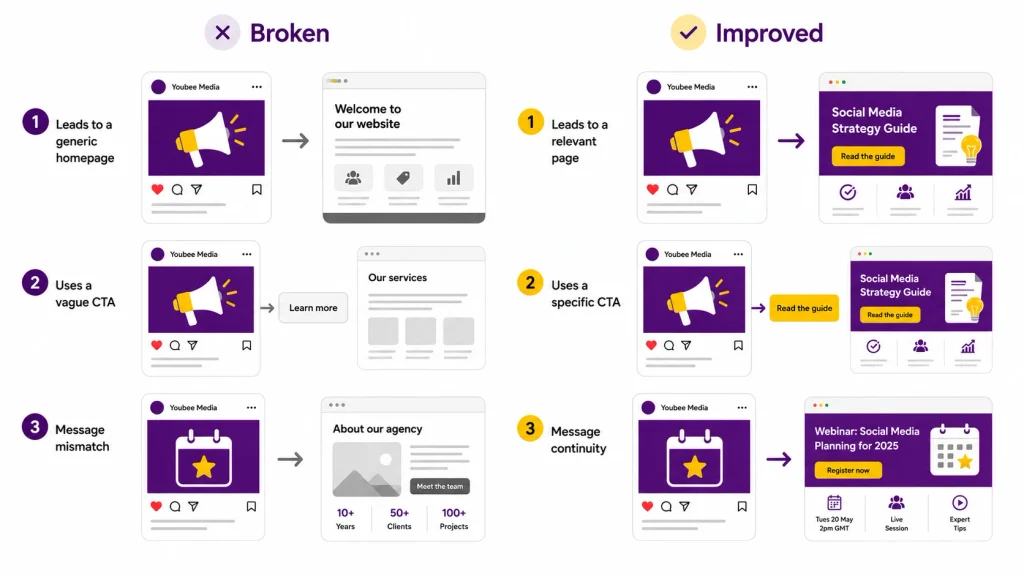
One of the most common problems is sending every visitor to the homepage. This forces people who clicked for a specific reason to find the relevant information again.
Another is changing the message after the click. A post may promise a practical guide while the linked page immediately pushes a sales enquiry. The page may still be related to the topic, but it does not deliver what the visitor expected.
Vague calls to action create a similar problem. If someone cannot tell what they will get after clicking, they have less information to help them decide whether the link is worthwhile.
Cluttered destination pages can also weaken the journey. Several competing banners, pop-ups and unrelated CTAs make it harder to identify the information that generated the visit.
Finally, do not assume that social activity is sending useful traffic simply because engagement is growing. Basic tracking helps separate posts that create visibility from those that regularly encourage people to continue onto the website.
Final Thoughts
Social media and your website perform different jobs, but they work better when the connection between them is planned. Consistent topics create recognition, relevant destination pages continue the conversation and clear calls to action help people understand where to go next.
Learning how to drive traffic to your website from social media is therefore less about adding links to every post and more about creating a useful route from discovery to deeper information. When the topic, link and destination support one another, visitors arrive with clearer expectations and the website has a better opportunity to help them take the next useful step.
Frequently Asked Questions
Does Social Media Help Increase Website Traffic?
Yes, social media can introduce people to website content, services, products and other resources. The amount and quality of traffic will depend on factors including the audience, content, CTA and relevance of the destination page.
Should Social Posts Link to the Homepage or a Landing Page?
Use the page that best continues the subject of the post. The homepage can be appropriate for broad brand content, but a service page, guide, case study or dedicated landing page is often more useful when the post covers something specific.
What Should a Social Media Landing Page Include?
It should quickly confirm the subject the visitor expected to find, provide useful supporting information and offer a clear next step. The exact layout depends on whether the page is educational, commercial or campaign-specific.
How Can I Track Visitors Coming From Social Media?
Website analytics can identify social traffic, while UTM parameters can provide more detail about particular sources and campaigns. Use consistent naming so reporting remains easier to interpret.
What Is a Good Call to Action?
The wording should describe the next useful action. Examples include reading a guide, viewing a project, comparing options, registering for an event or exploring a service, depending on what the post is about.